Collinear Faces#
Description#
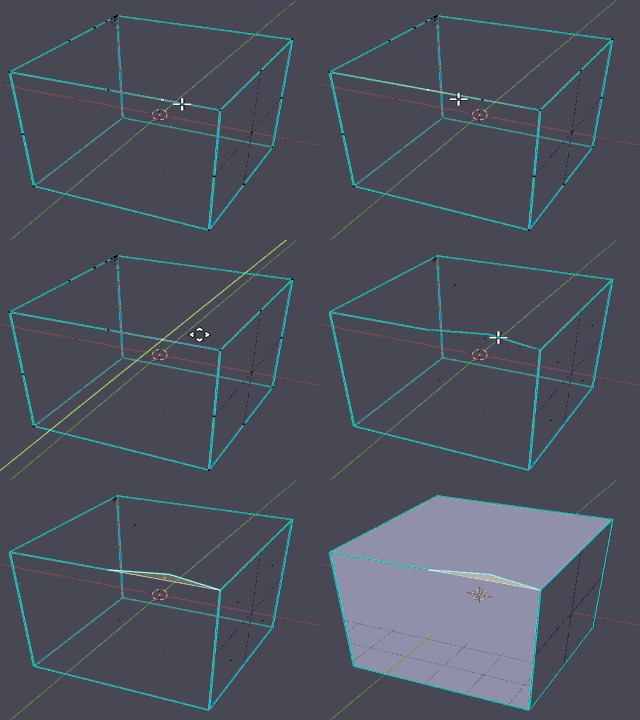
A collinear face is a polygon whose vertices all lie nearly on a single straight line, even if the face has non-zero area. Such faces are geometrically degenerate and contribute nothing meaningful to volume definition.
Collinear faces typically result from:
Mesh smoothing or edge contraction algorithms
Importing low-quality or simplified meshes
Numerical precision loss during format conversion
Unlike degenerate faces (which have zero area), collinear faces may have computed non-zero area due to numerical errors, but they are still invalid for acoustic simulation.
Detection#
Detection Method: Best-fit line + perpendicular distance
Tolerance: 1e-3 m (1 mm)
Detection process:
Find the two vertices with the largest pairwise distance (defines the reference line)
Calculate perpendicular distance of all other vertices from this line
If all vertices deviate by less than 1 mm from the line, the face is collinear
Note
This tolerance is distance-based (absolute, scale-independent). It applies regardless of model size.
Skip Condition: Faces with all vertices coincident are skipped (already caught by degenerate face detector).
Auto-Repair#
Status: ❌ No automatic repair
Action: Detection only
Collinear faces are reported but not automatically removed. This gives users the opportunity to inspect the geometry and decide on the best course of action (manual deletion, re-meshing, etc.).
Manual Fix / Avoidance#
In 3D Modelling tools (Before Export):
Identify collinear faces: - Use geometry checking tools - Visualize with wireframe or face normal display - Check for faces that appear “thin” or nearly planar along one axis
Remove or remesh: - Delete collinear faces manually - Make sure to check for any resulting holes or boundary edges